Rotor
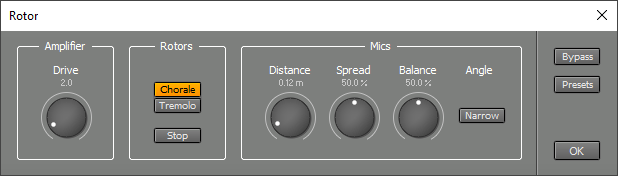 |
The Amplifier section contains the Drive control, which sets the level at which the tube amplifier operates. This can be used to add tube-style distortion.
The Rotors section controls the speakers' rotation speed. Chorale is slow, Tremolo is fast. The Stop button can be used to hold the rotors at a fixed position.
Your MIDI keyboard's Modulation Wheel can be used to switch speeds if the Rotor is used in an effect slot of a Wheel Organ or the MultitrackStudio Instruments. This is controller #1: 64 or higher is Tremolo, lower values correspond to Chorale. Also, the MIDI 2.0 Rotary Speaker profile is supported.
The Mics section controls the microphone placement used to record the speakers. Distance controls how far the mics are from the cabinet. Spread adjusts stereo channel separation. Balance sets the relative levels of the treble and bass speakers. The cabinet is miked with two microphones at a 180-degree angle. This angle can be reduced to 90 degrees using the Narrow Angle button.