Guitar Amp
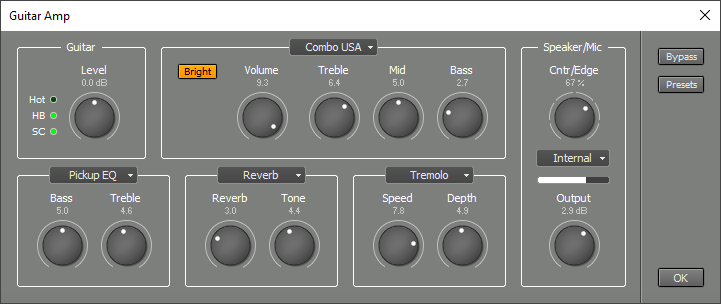
The Guitar Amp effect emulates three vintage guitar amps: Combo USA, Combo UK and Stack. It emulates the amp, its speaker and the microphone recording it. In addition up to three stompbox effects can be used.
 |
Guitar section
The Level knob controls the level of the guitar signal presented to the amp. The three lights located next to the knob serve as level indicator. They can be used to make the amp see the same input level a hardware amp would. The SC (single coil) light will light if the level equals the output of a single coil pickup. The HB (humbucker) light will light if the level equals the level of a humbucker pickup. The Hot light will light if the level is even higher. Note that the lights assume you're playing the guitar as hard as possible (eg. some powerful rhythm chords). The lights are supposed to light during the loudest signal peaks only. Don't worry if no light ever lights while playing more subtle parts: a real amp would see a lower level too.The lights are just a way to make it easy to set up the amp to work just like the hardware version. You can ignore them if you like. You can, for example, use a higher setting to get more distortion.
A guitar amp's 'Lo' input is typically 6 dB less sensitive than the 'Hi' input. You can turn the Input knob down by 6 dB in order to virtually plug your guitar in the Lo input.
Stompbox effect sections
Three stompbox effects can be inserted between the guitar and the amp. Auto Wah, Booster, Chorus, Compressor, Delay, Echo, Flanger, Noise Gate, Phaser, Pickup EQ, Reverb and Tremolo are available. Each effect features two knobs.Booster is a treble booster. A huge number of classic rock sounds were created using a device like this.
Pickup EQ can be used to change the characteristics of the guitar pickup. You can turn its Treble knob down to compensate for a shrill sound caused by a very short guitar cable, or to make a single coil pickup sound more like a humbucker. Turning Treble up can make a humbucker sound more like a single coil pickup.
Amp section
The Model buttons control the type of amp that's being used. The other controls are different for each amp model.The Combo US model features Volume, Treble, Mid and Bass knobs and a Bright switch. The Bright switch has no effect if the Volume knob is all the way up.
The Combo UK model features two channels. The Brilliant channel features Volume, Treble, Bass and Cut. The Cut knob attenuates high frequencies.
The Normal channels features Volume, Bass and Cut knobs. The Bass knob cuts a certain amount of bass, closely emulating the the bass response of various versions of this particular amp.
The Stack model features Volume, Treble, Mid and Bass knobs. In addition there are Bottom, Hot and Gain buttons. These buttons change certain components of the amp, and hence change the sound. All variations correspond to versions of the hardware amp being modeled.
Speaker/Mic section
The Cntr/Edge knob controls the position of the recording microphone. 0% is at the center of the guitar cab's speaker, 100% is at the edge. The knob offers 7 positions.You can use the box below the Cntr/Edge knob to load your own speaker impulse response file. The Cntr/Edge is not available in this case.
Note: the impulse responses are shared with the Convolutor effect.
The Output knob controls the output level. Typical values range from 0 dB (overdrive sounds) to approx. 10 dB (clean sounds). The horizontal meter shows the output level. It is important to stay out of the red section if the amp is played live, in order to avoid clipping.
Using the Guitar Amp
It's best to connect your guitar to a high impedance input. Low impedance inputs compromise the guitar pickup's treble response. Some sound devices have a dedicated instrument input. A high-impedance DI box or preamp can be used if your sound device doesn't have one. You can also try using a stomp box effect as DI box.To play the Guitar Amp live you should click the Track's Rec button, and turn on the Mon (Soft Monitoring) button (located at the top of the main window). This does not work with the Early Windows driver type.
In addition to the two stompbox effects you can use effects in the track's effect slots. You can place them in a Multi Effect if need more slots.
The Guitar Amp's output signal is similar to the signal coming from a microphone placed close to a guitar cab. One will typically apply studio type effects like EQ, compression and reverb to it. Clean guitar sounds will benefit from a Compressor effect (turn up the Attack knob to approx. 25 ms.).
The Guitar Amp uses significantly more CPU power than most other effects because it runs at a higher sample rate internally. It is, however, much more efficient if the input is silent (because the guitar plays the chorus only, or it plays the solo and the outro only etc.). You can take advantage of this feature by using an Automated Fader effect before the Guitar Amp to mute the silent parts in recordings. This is necessary because the noise which is always present in recordings will be seen as a non-silent signal by the Guitar Amp.